
Editorial note: This article was originally published on My Inner Creative and has been updated and republished in May 2026 under The Vessel’s editorial standards.
A bullet journal is a versatile organisational system that combines note-taking, task management, and creative expression into one streamlined method. Developed by Ryder Carroll, the bullet journal method provides an efficient way to manage tasks, track goals, and document various aspects of life in a customisable and intuitive manner.
The core principle of a bullet journal is to create an analogue system that adapts to individual needs, preferences, and goals. A single notebook serves as planner, to-do list, journal, and more — a blank canvas designed according to the requirements of whoever is using it.
Basic structure: rapid logging, collections, and indexing
- Rapid logging: At the heart of a bullet journal is the concept of rapid logging. Instead of writing long paragraphs, short succinct bullets record tasks, events, notes, and thoughts. Each bullet has a specific meaning: a dot for tasks, a circle for events, and a dash for notes.
- Collections: Beyond rapid logging, collections are dedicated pages or spreads where related information is organised. Collections can range from project plans and reading lists to travel itineraries and more. They provide a structured way to keep track of various aspects of work and life.
- Indexing: As the bullet journal fills with entries and collections, an index keeps everything findable. The index functions as a dynamic table of contents, with entries for each collection and major topic, making it easy to locate specific information later.
Adaptability for various purposes
One of the most practical aspects of bullet journaling is its adaptability. Whether for a student, a professional, an artist, or anyone who wants to stay organised, a bullet journal can be shaped to suit the task. Layouts, pages, and collections can be designed to match specific goals and priorities — meeting notes, fitness tracking, event planning, or project management all work within the same system.
This adaptability also means there is no fixed format to be locked into. If a particular layout or collection is not working, it can be adjusted or replaced entirely.
Applying bullet journaling to project management
Project management often involves juggling multiple tasks, deadlines, and team members while maintaining clear communication and progress tracking. The structured yet flexible nature of bullet journaling makes it a practical tool for managing projects of varying sizes.
- Rapid capture: The bullet journal’s rapid logging system ensures that tasks, ideas, and updates are captured quickly and nothing is lost — from brainstorming sessions through to last-minute changes.
- Customisation: No two projects are identical. A bullet journal can be designed with pages and layouts that align with the specific requirements of each project. A marketing campaign might need pages for content creation, social media scheduling, and analytics tracking; a software development project might benefit from a Kanban-style task board and dedicated sections for technical notes.
- Bridging digital and analogue: Traditional project management tools — whether digital software or physical whiteboards — can fall short in different scenarios. Digital tools can become overwhelming with excessive features or rigid structures; physical tools may lack the detail needed for complex work. The bullet journal sits between the two, combining the tactile advantages of pen and paper with genuine adaptability.
What is project management in your bullet journal?
Project management is the practice of planning, organising, and overseeing the execution of tasks, resources, and activities to achieve specific goals within a defined timeframe.
These nine areas originate from an earlier PMI framework and remain a useful reference for understanding the full scope of what professional project management addresses. In a bullet journal context, most personal and small-team projects will only engage four or five of them directly:
- Scope management — a project overview page defining what is and is not included in the project
- Time management — timeline spreads, milestone tracking, and weekly/daily planning
- Cost management — a budget and expenses collection if the project has financial components
- Communication management — stakeholder contact collections and meeting notes
- Risk management — a risk assessment collection noting potential problems and planned responses
- Integration management — the index and migration system that connects everything across the notebook
Quality, human resource, and procurement management are more relevant at organisational scale and can be noted in the journal as needed rather than built into its core structure.
For smaller personal or professional projects, many of these areas reduce to a manageable set of practical concerns rather than the full professional framework.
How do I add project management to my bullet journal?
Choosing the right journal and supplies
Selecting the right journal and supplies is an important first step. The choices made here affect how effectively project management tasks and ideas can be organised.
- Journal: Opt for a journal with sturdy, high-quality paper that handles different types of pens without bleeding or ghosting. Dotted or grid paper layouts provide structure without limiting layout choices. Leuchtturm1917, Moleskine, and Rhodia are widely used for their durable construction and range of sizes.
- Pens: Fine-tip pens, gel pens, and fineliners work well for detailed notation and drawing. Micron, Staedtler, and Sakura offer reliable options for bullet journaling.
- Markers and highlighters: A set of markers and highlighters enables colour coding and emphasis across project pages. Water-based markers such as Tombow Dual Brush Pens are versatile and blendable, useful for both functional and decorative purposes.
- Ruler and stencils: A clear ruler helps draw straight lines and create clean layouts. Stencils with various shapes assist in designing consistent banners, icons, and other repeated elements.
- Adhesives: Washi tape and adhesive dots can create tabs, secure loose pages, and add visual structure to spreads.
- Storage and carrying cases: A pouch or case keeps pens, markers, and supplies organised and accessible.
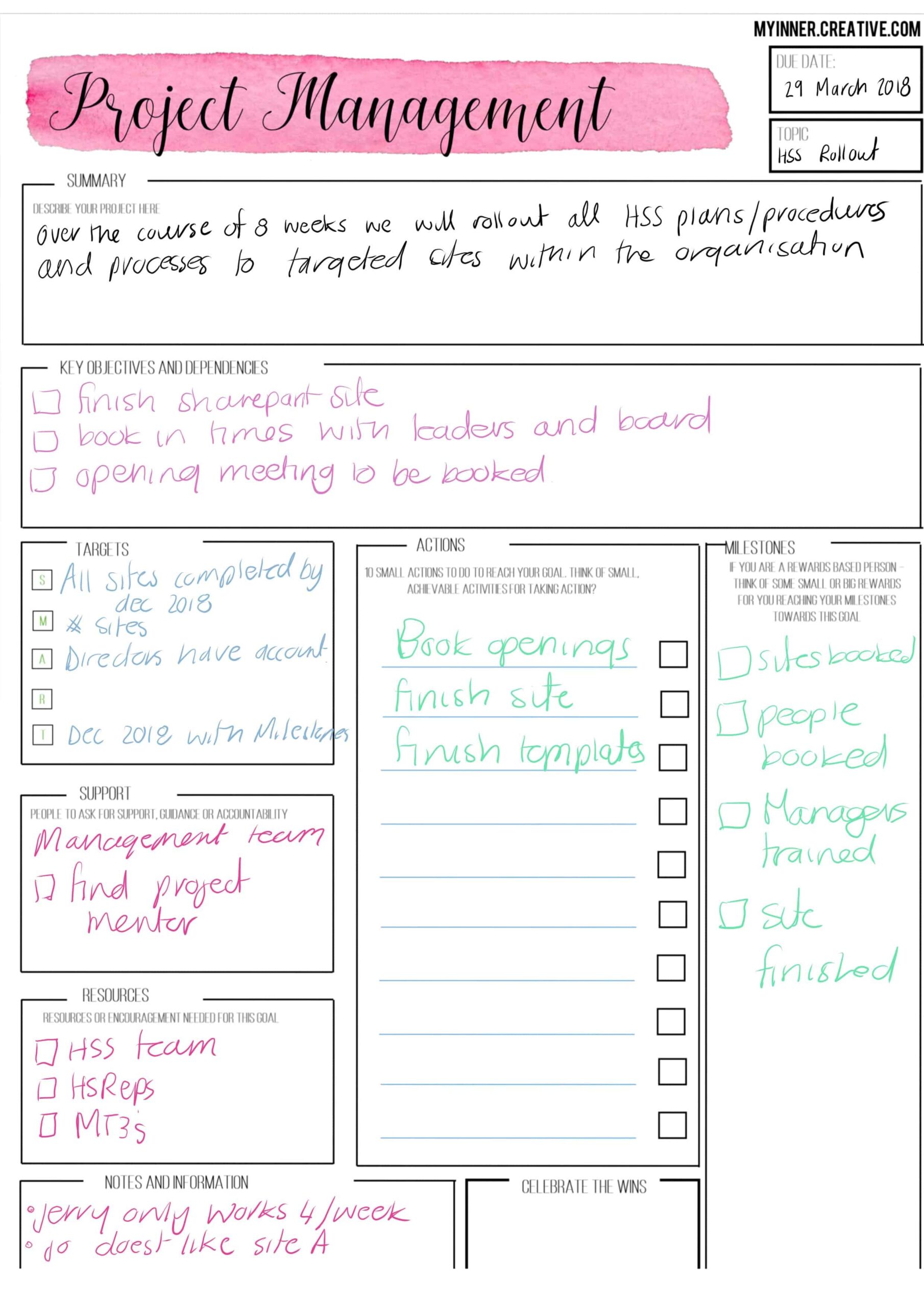
If you want a ready-made starting point, you can also download this Project Management 101 Printable.
Digital bullet journaling options
- Tablet and stylus: A tablet with a stylus allows for digital bullet journal pages with the feel of pen and paper. Apps such as GoodNotes, Notability, and OneNote offer features that closely mirror traditional bullet journaling.
- Digital note-taking apps: Apps such as Evernote, Trello, and Asana offer digital note-taking and task management that can complement a physical journal.
- Bullet journal apps: Dedicated apps bring the bullet journaling method into the digital environment, often including templates, indexing features, and customisation options.
The method works in either medium. Some practitioners combine both — digital tools for on-the-go access and a physical journal for more considered planning and reflection.
Designing your project pages
Dedicated project pages act as central hubs where all relevant information for a single project is gathered — tasks, progress, milestones, and notes in one place rather than scattered across weekly spreads.
Elements of project pages
- Headers: Begin each project page with a header stating the project name or title as a quick reference point.
- Task lists: A comprehensive task list breaks the project into smaller tasks and subtasks. Symbols such as checkboxes or circles denote completion or priority.
- Timelines and deadlines: A timeline section outlines key milestones and deadlines, making the shape of the project visible.
- Trackers: Depending on the project, trackers can monitor specific metrics — progress against targets, word counts, engagement figures, or any other measurable element relevant to the work.
- Notes and brainstorming: Space for working notes and ideas ensures that useful thinking arising mid-project is captured rather than lost.
Symbols, bullets, and icons
- Bullets: Different bullet types — dots, circles, dashes — distinguish between tasks, events, and notes, making project pages fast to scan.
- Symbols: Symbols indicate task priority, status, or urgency. A star can denote high-priority tasks; an exclamation mark can flag urgent ones.
- Icons: Simple icons represent specific actions or information consistently — an envelope for emails, a telephone for calls, a calendar for meetings or deadlines.
Monthly, weekly, and daily planning
Incorporating project-related tasks across monthly, weekly, and daily planning creates a consistent framework for managing work at different time horizons.
Monthly planning
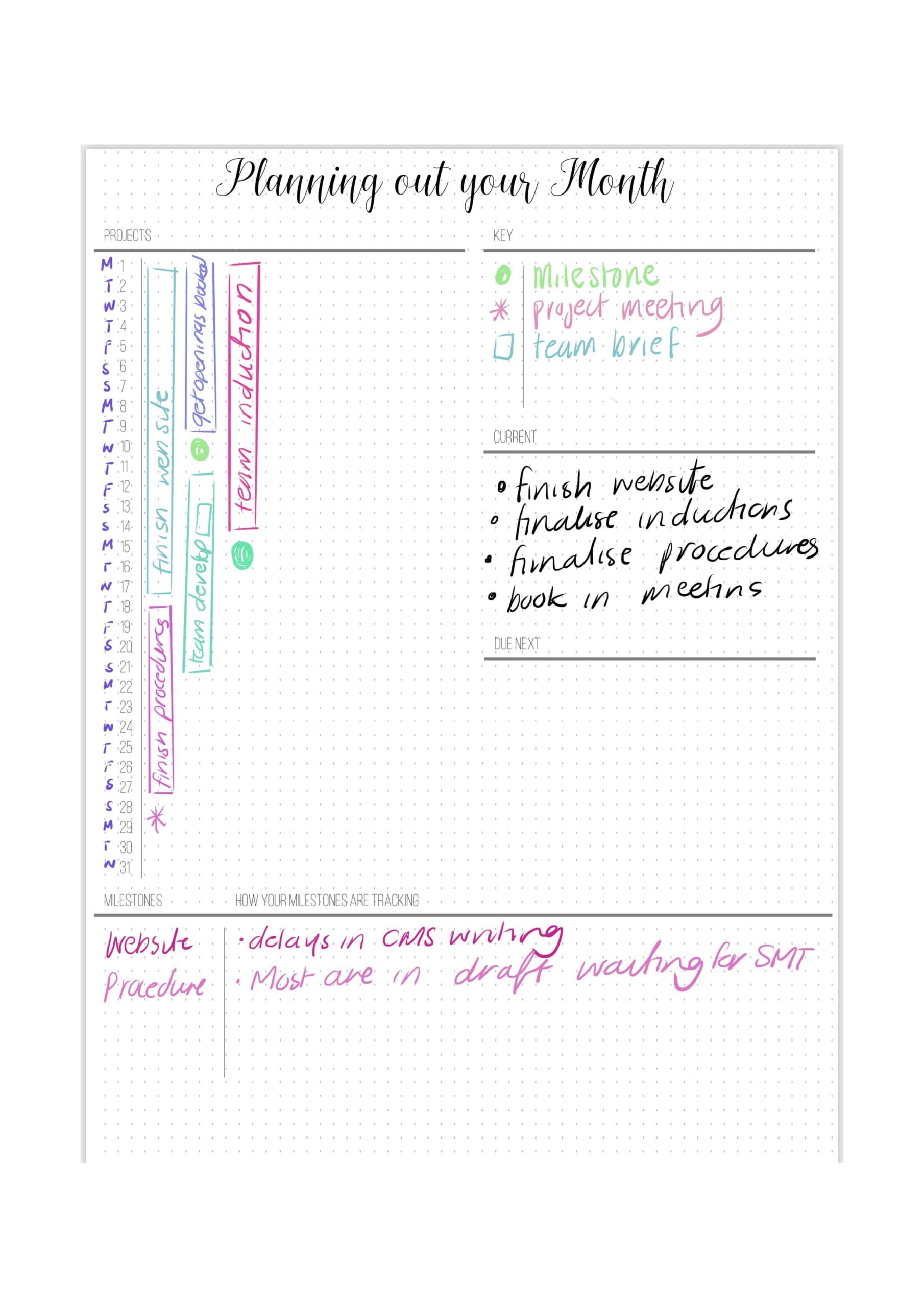
- Project overview: At the beginning of each month, review the dedicated project pages and identify the major milestones, deadlines, and tasks to address that month.
- Monthly goals: Break the project’s larger goals into smaller monthly objectives aligned with its timeline and milestones.
- Task allocation: Distribute specific tasks across the weeks of the month to ensure steady progress without last-minute pressure.
Weekly planning
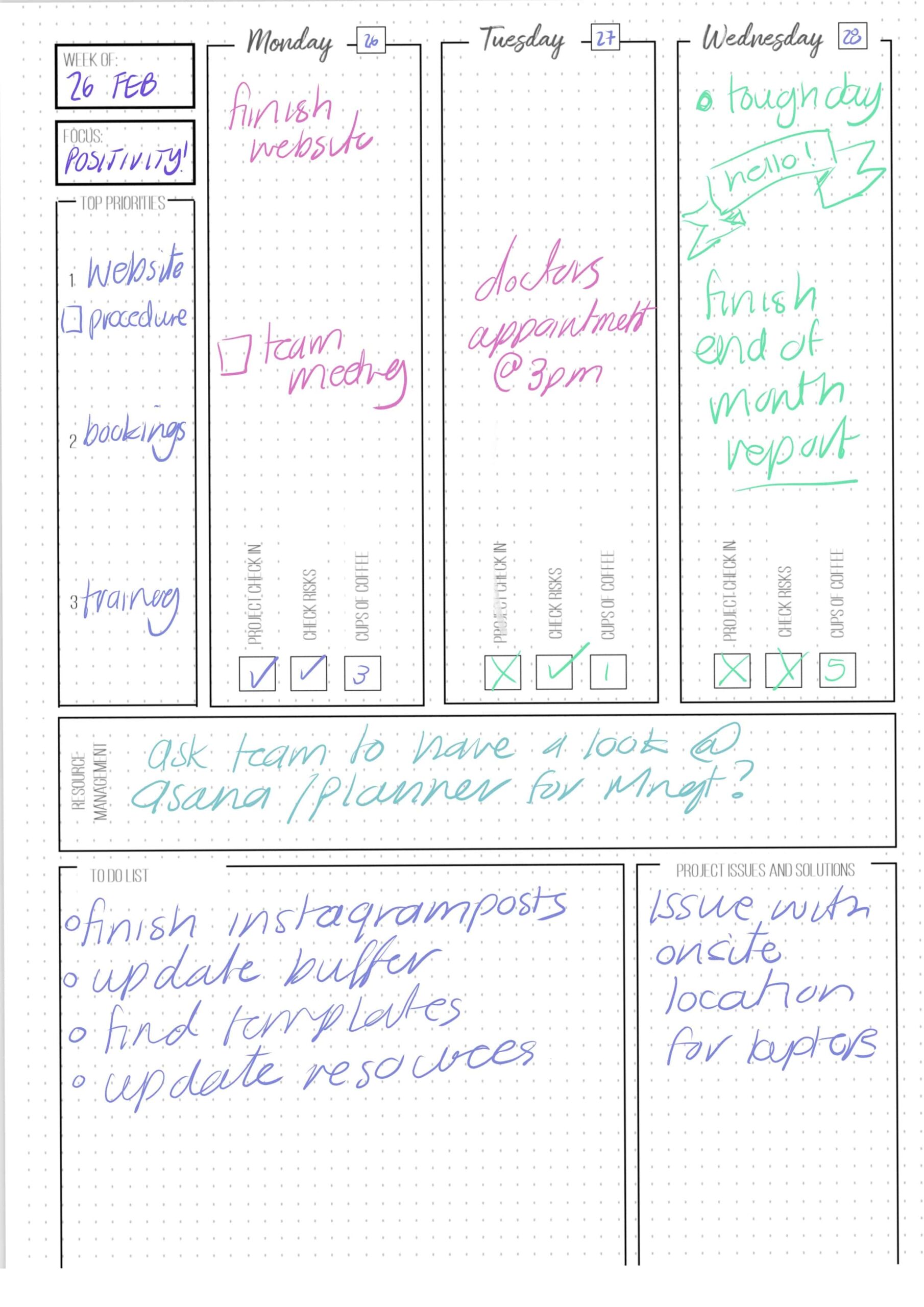
- Task prioritisation: Review the tasks allocated for the week and prioritise by importance and urgency.
- Time blocking: Allocate time blocks for project-related tasks within the weekly schedule to prevent them from being displaced by other demands.
- Review and adjust: At the end of each week, assess progress toward project goals and determine whether any tasks need rescheduling.
Daily planning
- Daily task selection: From the weekly task list, select specific tasks for the day, keeping the total realistic given other responsibilities.
- Time management techniques: Techniques such as the Pomodoro Technique or time blocking enhance focus while working on project tasks.
- Task completion and migration: Mark completed tasks as done and migrate unfinished ones to the following day or week so nothing is quietly dropped.
Migration and reviewing tasks
- Migration: Tasks not completed within their designated timeframe are migrated to the next planning period rather than left unaddressed.
- Review: Regular review of project tasks allows for an honest assessment of progress, identification of roadblocks, and adjustment where needed.
Custom collections for project-specific details
Collections are dedicated pages or spreads that hold information and resources related to a specific project. While the main project pages outline tasks and milestones, custom collections hold the project-specific detail that does not fit neatly elsewhere.
Suggested collection ideas
- Stakeholder contact information: Contact details for project stakeholders, team members, clients, and partners — quick access when communication or collaboration is needed.
- Brainstorming and ideation: A space for working through ideas, potential solutions, and approaches as they arise mid-project.
- Risk assessment and mitigation: A record of potential risks, their likely impact, and planned responses.
- Resource library: Links to articles, research, and reference material relevant to the project.
- Meeting notes and agendas: A record of meeting agendas, notes, and action items.
- Budget and expenses tracker: For projects with financial components, a collection tracking expenses, budget allocations, and financial targets.
- Feedback and reflection: A record of feedback received during execution — from clients, collaborators, or personal review.
- Visual mood board: For projects where aesthetics are relevant, a space for images, colour palettes, and visual references.
Integrating Agile and Kanban techniques
Agile methodologies and Kanban boards are project management approaches that translate naturally into the bullet journal format.
- Agile methodologies: Agile is an iterative approach to project management that focuses on delivering incremental value. Projects are broken into smaller tasks and worked through in short cycles called sprints.
- Kanban boards: Kanban uses visual boards, columns, and cards to manage tasks. Each card represents a task; columns represent stages in the workflow — typically To Do, In Progress, and Done.
Incorporating Agile and Kanban into a bullet journal
- Create a project Kanban spread: Set aside a two-page spread dedicated to the Kanban board, with columns for different stages of the workflow.
- Define columns: Common columns include Backlog, To Do, In Progress, and Done — adjusted as needed to match the specific workflow of each project.
- Design cards: Each task becomes a card, with the task name and any relevant details such as priority or due date.
- Visualise progress: As tasks move through the workflow, their cards shift across the columns, making progress visible at a glance.
- Daily stand-ups: A small section on daily planning pages for a brief stand-up note — tasks completed, tasks in progress, any blockers — keeps the project log current.
- Retrospectives: At the end of each week or sprint, a retrospective section records what went well, what could be improved, and what to adjust going forward.
Benefits of integrating Agile and Kanban
- Visual tracking: The Kanban board provides a clear overview of task progress and where bottlenecks are forming.
- Flexibility: Agile’s iterative approach aligns with the bullet journal’s adaptable format.
- Collaboration: The transparency of a Kanban board supports communication among team members.
- Continuous improvement: Regular retrospectives build a habit of evaluating and refining the approach across successive projects.
Should there be a separate bullet journal for work?
A separate notebook is not required, but it may make sense when projects are large enough to fill a notebook on their own. Using the back of a single notebook for project-related activities makes it possible to keep meetings, agendas, and project management in one place.
If digital project management tools are also in use, updating both systems at the same time prevents information from falling out of sync.
Using colour coding and signifiers for project management
Advantages of colour coding
- Quick identification: Colour coding categorises tasks, deadlines, and priorities at a glance. Different colours represent different categories, making information retrieval faster.
- Visual hierarchy: Colours create a natural hierarchy — bold, bright colours draw attention to high-priority tasks; softer colours recede for less urgent ones.
- Improved organisation: Colour-coded tasks cluster visually, making patterns and relationships easier to see across a spread.
- Memory aids: Consistent colour associations support faster recall of tasks and deadlines over time.
Introducing signifiers
- Task status: Symbols such as checkboxes indicate completion — a hollow box for in progress, a filled box for done.
- Task importance: Stars or exclamation marks signal importance or urgency.
- Urgency: Icons such as lightning bolts or clocks represent tasks with approaching deadlines.
- Notes or follow-ups: Speech bubble symbols flag tasks requiring further notes or follow-up actions.
Implementing colour coding and signifiers
- Choose a colour palette: Select a set of colours that are easy to distinguish and assign them to consistent categories.
- Create a legend: Dedicate a page to a legend explaining each colour and signifier, keeping the system interpretable over time.
- Apply colours and symbols: As tasks, deadlines, and priorities are added to the journal, apply the chosen colours and symbols to categorise them.
- Regularly review and update: Review the legend periodically to ensure it still reflects how the journal is actually being used.
- Experiment and adjust: If certain colours or symbols are causing confusion, revise the system. The goal is notation that is fast and reliable.
Implementing time management techniques
The Pomodoro Technique
The Pomodoro Technique involves working in focused intervals — typically 25 minutes — followed by a short break of 5 minutes. After four intervals, a longer break of 15 to 30 minutes is taken.
- Set up Pomodoro spreads: Designate a spread for Pomodoro sessions with a timer for each interval and space to note the tasks being worked on.
- Track Pomodoros: Use symbols to record completed intervals — a filled circle for a completed Pomodoro, an empty circle for a break.
- Notes and reflections: Reserve space to note any distractions or challenges encountered and how they were handled.
Time blocking
Time blocking allocates specific time slots to different tasks or categories of work, ensuring that each task has dedicated time and reducing context-switching.
- Create time blocking spreads: Divide a page into time slots and assign tasks to each period.
- Plan the day: Fill time slots with the tasks intended for each period, including both project work and other responsibilities.
- Stay accountable: Mark completed tasks as work progresses and adjust if a task takes longer than expected.
Case study: a marketing campaign launch
The following example shows how these approaches can work together across a single project. The project is a launch campaign for a new product line. The person coordinating the campaign — responsible for content creation, social media, email newsletters, and results tracking — uses a bullet journal as the primary planning tool throughout.
- Project overview: The journal opens with an overview page: campaign name, launch date, objectives, and key performance indicators.
- Monthly spread: At the start of the month, a two-page spread maps the major milestones against a timeline showing deadlines and priorities.
- Weekly planning: Weekly spreads break tasks into executable units, with content creation, outreach, and meetings each allocated specific time blocks.
- Daily execution: Daily spreads list the tasks for each day. The Pomodoro Technique structures focused work intervals, with brief journal updates during breaks.
- Collections: Supporting the main project page are collections for visual branding guidelines, brainstorming, media contacts, and a Kanban spread tracking every task across To Do, In Progress, and Done.
- Reflection and adaptation: At the end of each week, a retrospective notes what was accomplished, what fell short, and what adjustments are needed.
- Integration with digital tools: QR codes in the journal link to product pages, social media posts, and analytics reports.
- Results and analysis: As the campaign runs, engagement, traffic, and sales data are transferred into the journal and measured against the KPIs set at the outset.
The journal keeps campaign details organised and accessible, supports focused execution through structured time management, and produces a running record that informs both the current campaign and future ones.
Leveraging digital tools alongside a bullet journal
Syncing with digital project management tools
- Efficiency: Digital tools handle rapid data entry, automated reminders, and task tracking. Syncing reduces manual transcription and keeps both systems current.
- Real-time updates: Changes made in a digital app can be reflected in the journal at the next sync point, keeping all collaborators aligned.
- Remote access: Digital tools are accessible from any device, covering the live operational layer while the journal handles planning and reflection.
- Reporting: Digital apps generate reports and analytics that can be transferred into the journal for review alongside handwritten notes.
Examples of tools that complement bullet journal project management
- Trello: The closest digital equivalent to a bullet journal Kanban spread. Cards and columns map directly onto the format described above, making it the most natural companion for anyone already using a Kanban layout in their journal.
- Asana: Better suited to projects with multiple collaborators. Its dependency tracking and milestone views cover team-facing complexity that a physical journal handles less well at scale.
- Todoist: A lightweight task list that syncs well across devices. Most useful as a capture tool on the go — tasks logged in Todoist are transferred into the journal during the next planning session rather than managed in both places simultaneously.
- Notion: The strongest choice for projects that generate large volumes of reference material — research, documentation, databases — that would consume too many journal pages to be practical. The journal handles active planning; Notion holds the archive.
- Evernote: Useful for storing and tagging project-related notes, clippings, and reference articles. Works well as the digital equivalent of the resource library collection.
Incorporating digital visuals and resources
- QR codes: QR codes can link directly to web pages, shared documents, or digital resources. Generated online and pasted into the journal, they provide instant access to linked material when scanned.
- Digital sketches: Sketches created in drawing apps can be printed and included in the journal alongside handwritten notes.
- Online resources: A dedicated collection listing links to relevant articles, templates, or reference sites keeps useful material close to the pages where it applies.
Reflecting and adapting for improved project management
Analysing completed projects
- Review goals: Revisit the goals set at the start of the project and evaluate whether they were achieved.
- Assess timeline and milestones: Examine how closely the project tracked its planned timeline and note any delays and their causes.
- Evaluate team dynamics: Where relevant, consider how collaboration and communication worked across the project.
- Gather feedback: Feedback from team members, stakeholders, or clients provides perspective on what worked and what did not.
- Analyse risks and mitigation: Review the risks identified during planning and assess whether mitigation strategies were effective.
- Document lessons learned: A dedicated section in the journal records the key takeaways — both what worked and what did not — for reference on future projects.
Identifying areas for growth
- Highlight successes: Identify what contributed to the project’s success and note patterns worth repeating.
- Pinpoint challenges: Identify roadblocks and setbacks, and determine whether they were avoidable.
- Implement changes: Adjust processes, communication methods, or resource planning based on what the review shows.
- Set new goals: Apply the lessons learned to set objectives for the next project that reflect the improvements identified.
A notebook that holds not just the tasks but also the thinking behind them — and the assessment of how they went — becomes a practical record of how an approach to project management develops from one project to the next.


Putting it into practice
The method described above works best when it is treated as a starting point rather than a fixed system. Most people who use bullet journaling for project management settle into a personal version of it over time — dropping the elements that add friction, keeping the ones that genuinely help, and adjusting layouts as projects change in size and complexity.
The most consistent finding from practitioners is that the physical act of writing — planning a week, migrating tasks, running a retrospective — produces a different kind of engagement with the work than moving cards across a digital board. The journal becomes a record not just of what was done, but of how decisions were made and what was learned. That record compounds in usefulness across successive projects.
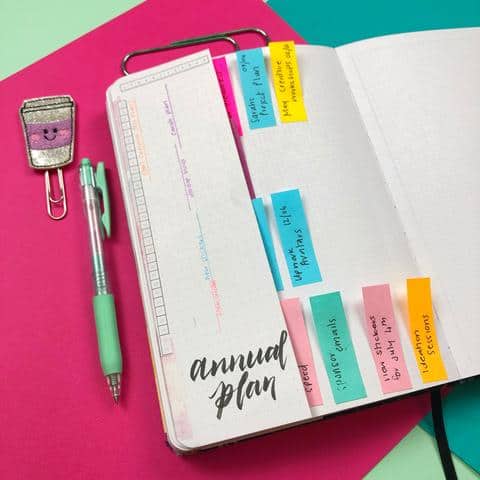
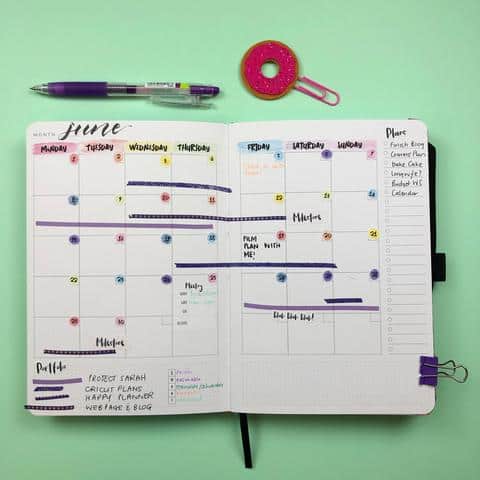
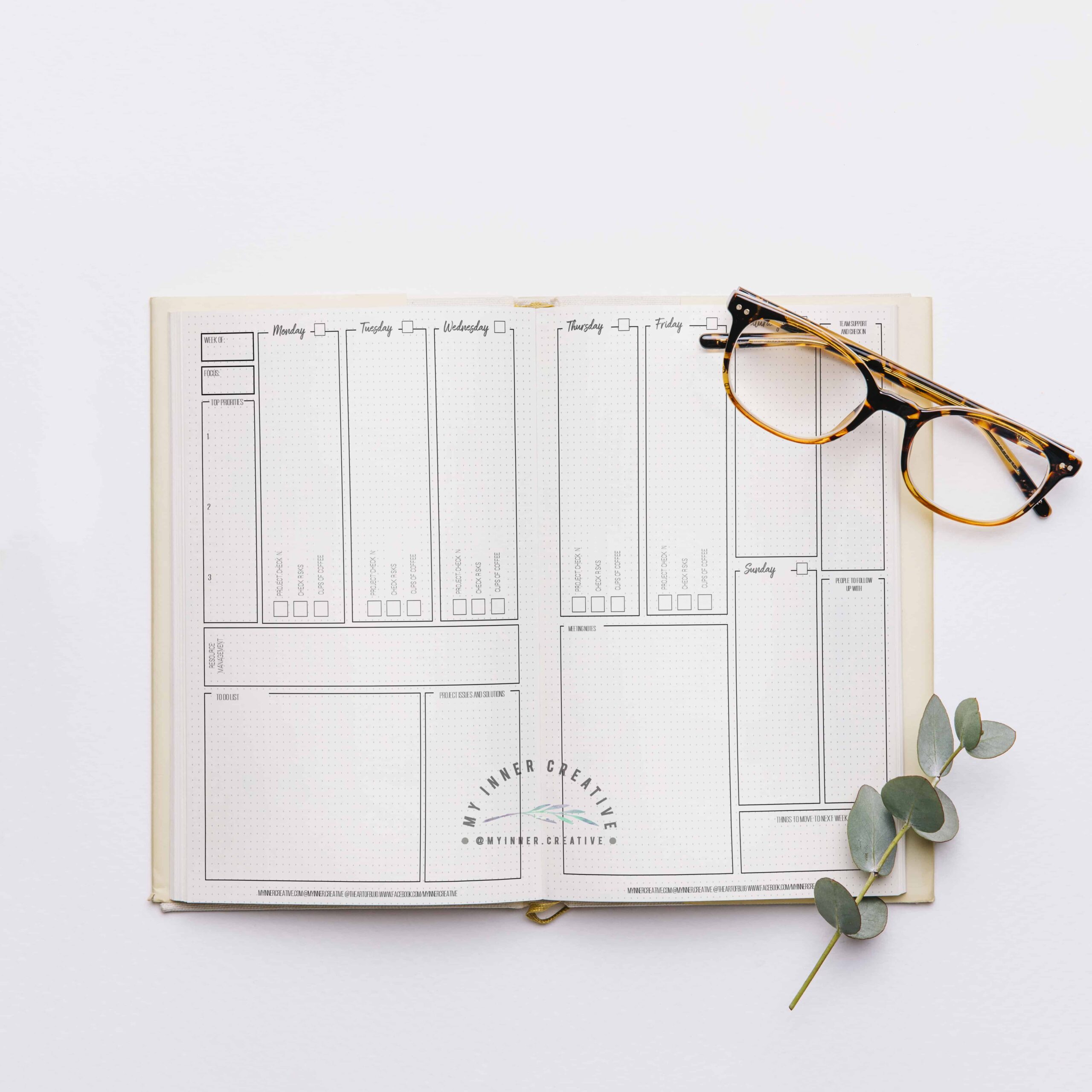
The spreads below illustrate a range of approaches to project management layouts — Kanban boards, weekly project spreads, monthly overviews, and time trackers — across different notebooks and working styles. Use them as reference points for designing layouts that fit your own workflow rather than templates to replicate exactly.